
Popit Powerup
| Popit Powerup | |
|---|---|
 |
|
| Game: | LittleBigPlanet 3 |
| Type: | Gameplay Kits |
| Category: | Powerups |
| In-Game Category: | Special Powerups |
| Obtained from: | Start |
The Popit Powerup is a powerup in LittleBigPlanet 3 that allows Sackboy to use certain Create Mode tools in Play Mode.
Overview
The Popit Powerup can be equipped by running through its pedestal, or within two adjacent, unobstructed layers of it. When equipped, the player gains access to certain Create Mode tools, which can be accessed in the Popit menu. Depending on how the powerup was tweaked, they can also use VCR controls;  to Pause, and
  to Undo or Redo.
Frequently, the player will have access to the Popit Cursor, which functions similarly to Create Mode, albeit with certain limitations. The player can only interact with objects that have an active Popit Powerup Tweaker attached to them, and their ability to manipulate it is governed by how the tweaker is set up. For example, one object could be set so the player can pick it up but not delete or copy it, while another could be set to only allow player to tweak gadgets or connectors that are attached to it.
The player can also add new objects to the level, though the items available depend entirely on how the Popit Powerup is tweaked; creators can choose which items from the Goodies Bag and Tools Bag will be available to players when equipped. Certain item categories are blacklisted from the Popit Powerup, including all audio objects and Logic Containers — exceptions to the latter include Sackbots, the Character Animation Tweaker, its Object counterpart, and developer gadgets like the Hud Element.
When placing a Gadget from the Tools Bag, it forces its Visibility setting to "Yes" (or "Switch and Cables Visible" where applicable) so that the player can see and interact with it in Play Mode; it also hides that tweak so that the player can't make it invisible. Notably, this also applies to gadgets that otherwise can't be tweaked, such as the Creature Navigator.
As the Popit Powerup alters the contents of the user's Popit rather than their moveset, Sackboy retains the ability to grab, and can also use it underwater or in Floaty Fluid.
The Popit Powerup is one of the few native powerups that is not compatible with the Sackpocket inventory system. If a creator uses the Capture Sackpocket Item Tool on one, the game will simply spawn the powerup's pedestal at the player's location when attempting to equip it.
Tweaks
 |
Physical Properties: ( Static • Static • Dynamic Dynamic When Static, the object cannot be moved while time is unpaused. When Dynamic, the object can be moved and is subject to gravity. |
Inventory
 |
Choose Goodies: (Materials; Collected Objects; My Objects) Choose which items will appear in the Goodies Bag when using the powerup. |
|
Choose Tools: (Tools; Gadgets; Gameplay; Creatures & Characters) Choose which items will appear in the Tools Bag when using the powerup. |
Controls
 |
Popit Cursor: ( No • No • Yes Yes Sets whether or not the player has access to the Popit Cursor. |
 |
VCR Controls Sets whether or not the player can use the Pause, Undo and Redo functions on  . . |
Special Properties
 |
Grid Snap: (None •Small • Medium • Medium • Big Big Sets which Grid Snap mode to use. |
 |
Freeze Sackboy When Paused: (No •Yes If set to Yes, the player will be frozen in place if they press to pause the level. Note that the player does not conserve their speed when unpausing. |
Layer Boundaries
 |
Front Layer: (1 - 17) Sets the frontmost layer boundary. The player cannot manipulate objects on layers in front of this point. |
 |
Back Layer: (1 - 17) Sets the backmost layer boundary. The player cannot manpulate objects on layers behind this point. |
Behaviour
 |
Can Be Dropped: (No •Yes Determines whether or not the Popit Powerup can be dropped by pressing  . . |
Personal Menu Exploit
If the Popit Cursor or any item in the Goodies Bag or Tools Bag is made available, the Personal Menu will be inaccessible, but if nothing is enabled, then it is accessible. In this state, the Personal Menu is able to access anything it could in Create Mode, even in Play Mode, with the exception of the Tools and Used Object page and any hearted Functions such as Capture Object. Aside from those exceptions, this has no restriction compared to the Popit Powerup, meaning this is the only way some things can be brought out from the Popit in Play Mode outside of game modification. This includes:
- Logic Containers
- Audio objects
- Backgrounds
- Bugged Sackbot mesh objects
- Notably, the Sackboy decal does not have a visibility tweak, so like the aforementioned Creature Navigator it can only be set to be visible in Play Mode through this exploit.
Related Achievements
 |
Genius at Play Picked up the Popit Powerup |
Gallery
Model Renders




Official Artwork
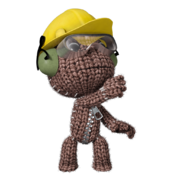 Sackboy using the Popit Powerup.

See Also
| Mobility |
| ||
|---|---|---|---|
| Grabbing | |||
| Weapons |
| ||
| Miscellaneous |
| ||
| Custom Powerups |
| ||


| Level Kit | |
|---|---|
| Collectibles | |
| Powerups | |
| Decorative | |
| Unreleased | |
| Removed | |


